ASSISTYU

ASSISTYU VPN

Complete Setup & Support Guide

Your all-in-one resource for installing, activating, and mastering AssistYu VPN on Windows & macOS

Military-grade encryption 50+ server locations Unlimited bandwidth No-logs policy
OVERVIEW

What is AssistYu VPN?

AssistYu VPN is a premium Virtual Private Network software that creates a secure, encrypted tunnel between your device and the internet. It masks your real IP address, protects your online activities from surveillance, and allows you to browse anonymously without geographical restrictions.

256-bit AES encryption
Automatic kill switch
DNS leak protection
Split tunneling
COMPATIBILITY

System Requirements

Windows 8, 10, 11
macOS Monterey, Ventura, Sonoma, Sequoia
One license protects 1 or 3 devices depending on your purchased plan
GET LICENSE

Purchase & License Key

After completing your purchase, you'll receive your unique license key via email within minutes

License key sent to your registered email
Check expiration: Click gear icon → "License Information"
Need to cancel? Contact PayPro Global customer support
Purchase AssistYu VPN
INSTALLATION GUIDE

Install on Windows or macOS

Follow these detailed steps for a successful installation on your device

1 Download the .exe installer
2 Run as Administrator
3 Accept UAC prompt
4 Follow wizard → Finish
💡 Tip: If SmartScreen appears, click "More info" then "Run anyway"
1 Download the .dmg file
2 Open DMG → Drag to Applications
3 Launch from Applications folder
4 Allow security override if needed
💡 Tip: If "unidentified developer", go to Privacy & Security → Open Anyway
ACTIVATION

Register & Activate Your License

Two simple steps to unlock all premium features
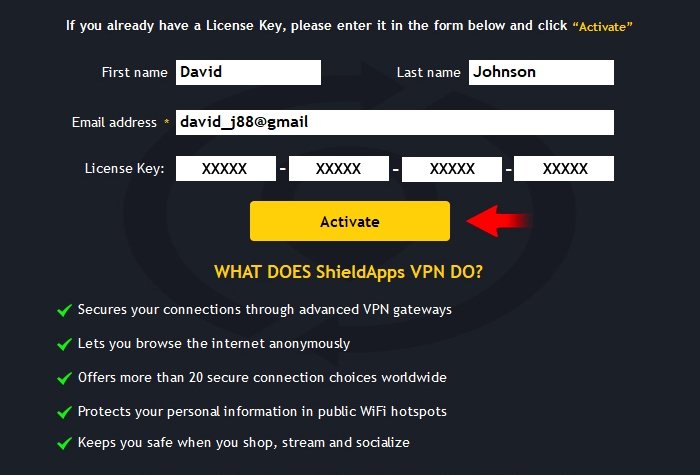
Step 1
STEP 01

Enter Your Personal Information

Open AssistYu VPN, click the Activation button. Fill in:

  • First name & Last name
  • Email address used for purchase
Email must match your order exactly
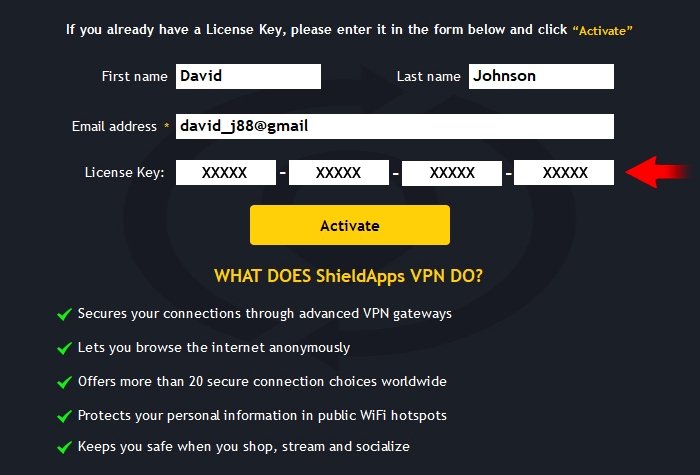
Step 2
STEP 02

Paste License Key & Activate

Copy your license key (format: XXXXX-XXXXX-XXXXX-XXXXX). Paste it, then click "Activate".

✅ Green confirmation = fully unlocked!
For iOS: license key = password

Activation Troubleshooting

  • Invalid key: Copy exactly without extra spaces
  • Email not recognized: Use the exact email from purchase
  • Still issues? Contact support via banner below
CONNECTING

Connect to a Secure Server

Get protected in seconds with our one-click connection

Launch AssistYu VPN
Select a server location
Click "Connect" button
You're protected! (3-5 sec)
Your real IP is hidden • All traffic encrypted • Browse anonymously
Pro tip: Star your favorite servers for one-click access Use "Fastest Server" for optimal speed
REMOVAL

How to Uninstall AssistYu VPN

Complete removal guide for Windows and macOS

Windows 10 / 11

  1. Settings → Apps → Installed apps
  2. Find "AssistYu VPN" → Uninstall
  3. Follow wizard → Restart PC
Alternative: Control Panel → Programs and Features

macOS

  1. Finder → Applications folder
  2. Right-click AssistYu VPN → Move to Bin
  3. Empty Bin to complete removal
Reinstall anytime using the same license key
ARCHIVE

Previous Versions

Legacy installers for older operating systems

v2.1.8Windows 8 / 8.1 / 7 SP1Download .exe
v2.0.5Windows 32-bit systemsDownload .exe
v1.9.4macOS Big Sur / CatalinaDownload .dmg
v1.8.2macOS Mojave / High SierraDownload .dmg
Older versions receive limited updates. Use latest version for optimal security.
KNOWLEDGE BASE

Frequently Asked Questions

What is AssistYu VPN?
AssistYu VPN creates an encrypted tunnel between your device and the internet, hiding your IP address and protecting your privacy online using AES-256 encryption.
How many devices can I protect?
Standard license: 1 device. Premium license: up to 3 devices simultaneously.
Activation fails?
Ensure correct email and license key format, check internet connection, then retry. Contact support if persists.
How do I cancel my subscription?
Go to PayPro Global customer support, fill in your order details, and submit a cancellation request. 30-day money-back guarantee available.
Still need help? Our support team is available 24/7 to assist you